
In the age of the digital ecosystem, businesses rarely rely on a single software. They use Slack for communication, HubSpot for CRM, Gmail for email, and Trello for tasks. The challenge lies in getting these disconnected islands of data to talk to each other. Enter the iPaaS (Integration Platform as a Service) leaders: Zapier and Make (formerly Integromat). These two giants dominate the automation landscape, promising to connect your apps without a single line of code. However, they approach automation with vastly different philosophies, pricing models, and complexity levels. This definitive showdown compares the user experience, power, and cost of Zapier and Make to help you choose the engine that will drive your automated business in 2025.
1. The Core Philosophy: Simplicity vs. Visual Power
While both tools ultimately achieve the same goal—moving data from App A to App B—the journey is distinct.
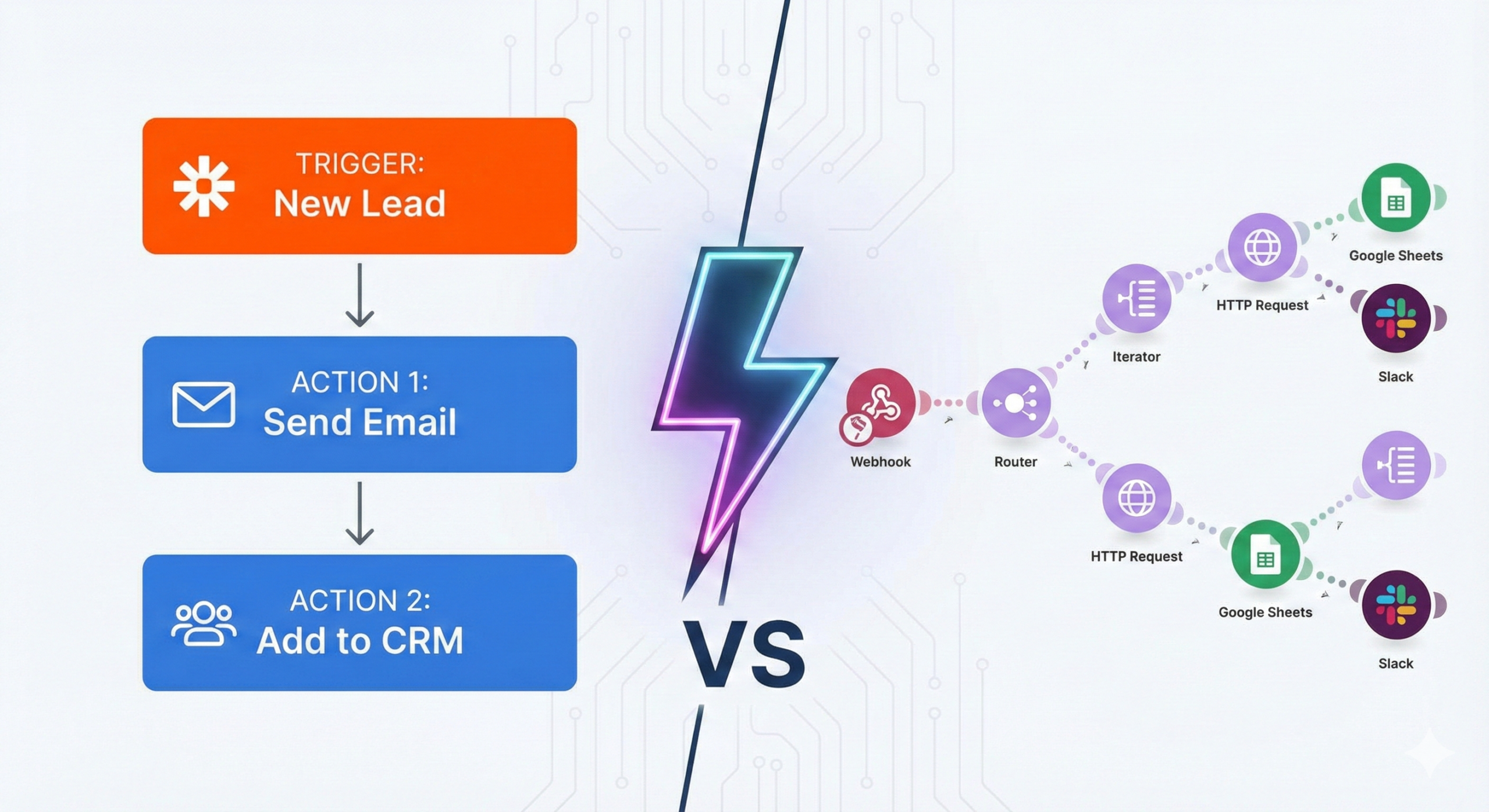
Zapier: The Linear Approach
Zapier creates “Zaps,” which are linear, step-by-step workflows.
- Philosophy: “If This, Then That.” It is built for accessibility.
- Experience: You set a Trigger (e.g., “New Lead in Facebook Ads”) and an Action (e.g., “Send Email”). It flows vertically, top to bottom. It is rigid but incredibly hard to mess up. It is designed for non-technical marketers and business owners who want a quick fix.
Make: The Visual Canvas
Make operates on “Scenarios,” which are built on a visual, drag-and-drop infinite canvas.
- Philosophy: “Logic and Visual Flow.” It looks like a mind map.
- Experience: You place bubbles (modules) on a canvas and connect them with lines. You can watch the data travel between bubbles in real-time. It allows for complex branching, loops, and data manipulation that Zapier struggles to replicate visually. It is designed for visual thinkers and those who need granular control.
2. Ease of Use and Learning Curve
Zapier (The “Apple” Experience)
Zapier is the clear winner for beginners. Its editor holds your hand through every step. It predicts what data you want to map and handles errors gracefully. If you need to connect two apps in 5 minutes without reading a manual, Zapier is the tool.
- Pros: Extremely intuitive; massive library of pre-built templates.
- Cons: Rigid structure makes complex logic (like “if/else” paths) feel clunky.
Make (The “Android” Experience)
Make has a steeper learning curve. The freedom of the open canvas can be intimidating. Understanding concepts like “Iterators,” “Aggregators,” and “Arrays” requires a basic understanding of data structures. However, once mastered, this interface is significantly faster for building complex systems.
- Pros: Unmatched visual clarity for complex workflows; you can see exactly where data splits and merges.
- Cons: Requires time to learn; less “plug-and-play” than Zapier.
3. Pricing: The Wallet Impact
Pricing is often the deciding factor, and the difference here is stark.
Zapier: The Premium Choice
Zapier is expensive. It charges per “Task” (every time an action happens).
- Cost: Plans start high and scale steeply.
- The “Zapier Tax”: Simple workflows can burn through tasks quickly. For example, filtering spam requires a task. Multi-step Zaps require a paid plan immediately.
- Verdict: You pay a premium for the ease of use and the massive integration library.
Make: The Budget-Friendly Option
Make is significantly cheaper, often costing 1/5th to 1/10th of the price of Zapier for the same volume of work. It charges per “Operation.”
- Cost: Generous free plan and very affordable entry-level tiers.
- Efficiency: Make is more efficient with operations. Plus, you can execute complex logic without upgrading to an Enterprise plan.
- Verdict: Make offers significantly better value for money, especially for high-volume automation.
4. Integration Library and Connectivity
Zapier: The King of Connections
Zapier integrates with over 6,000 apps. If a SaaS tool exists, it almost certainly connects to Zapier first. This is Zapier’s moat. For obscure or brand-new apps, Zapier is often the only option.
Make: The Quality over Quantity
Make connects to around 1,600+ apps. While fewer than Zapier, it covers all the major players (Google, Microsoft, Meta, HubSpot, etc.).
- The API Advantage: Where Make shines is its generic “HTTP/API” module. It allows you to connect to any service that has an API, even if Make doesn’t have a native app for it. This makes it infinitely extensible for technical users, whereas Zapier limits you to what they officially support (unless you use their rigid Webhooks).
5. Handling Complexity: Error Handling and Logic
- Zapier: Great for simple linear tasks (A -> B -> C). While it introduced “Paths” for branching logic, it becomes visually messy and expensive (Paths are a premium feature). Error handling is basic; if a Zap fails, it just stops.
- Make: Built for complexity. You can create infinite branches, loops, and complex filters effortlessly. Crucially, Make has robust Error Handling. You can tell a scenario: “If this error happens, don’t stop; wait 5 minutes and try again, or store the data in a Google Sheet for review.” This reliability is essential for business-critical automations.
6. Conclusion: Which Tool Automates Your Future?
The choice between Zapier and Make comes down to your budget and your appetite for complexity.
- Choose Zapier if:
- You have a healthy budget and value time-saving over cost-saving.
- You have simple, linear workflows (e.g., “Send new leads to Slack”).
- You are non-technical and want the easiest possible experience.
- You use niche apps that only integrate with Zapier.
- Choose Make if:
- You want the best value for money (high volume, low cost).
- You need to build complex workflows with branching logic and data manipulation.
- You are a visual thinker or have a technical mindset.
- You want robust error handling to ensure your business never misses a beat.
Final Verdict: Start with Zapier to learn the basics. Upgrade to Make when your bill gets too high or your ideas get too complex.