
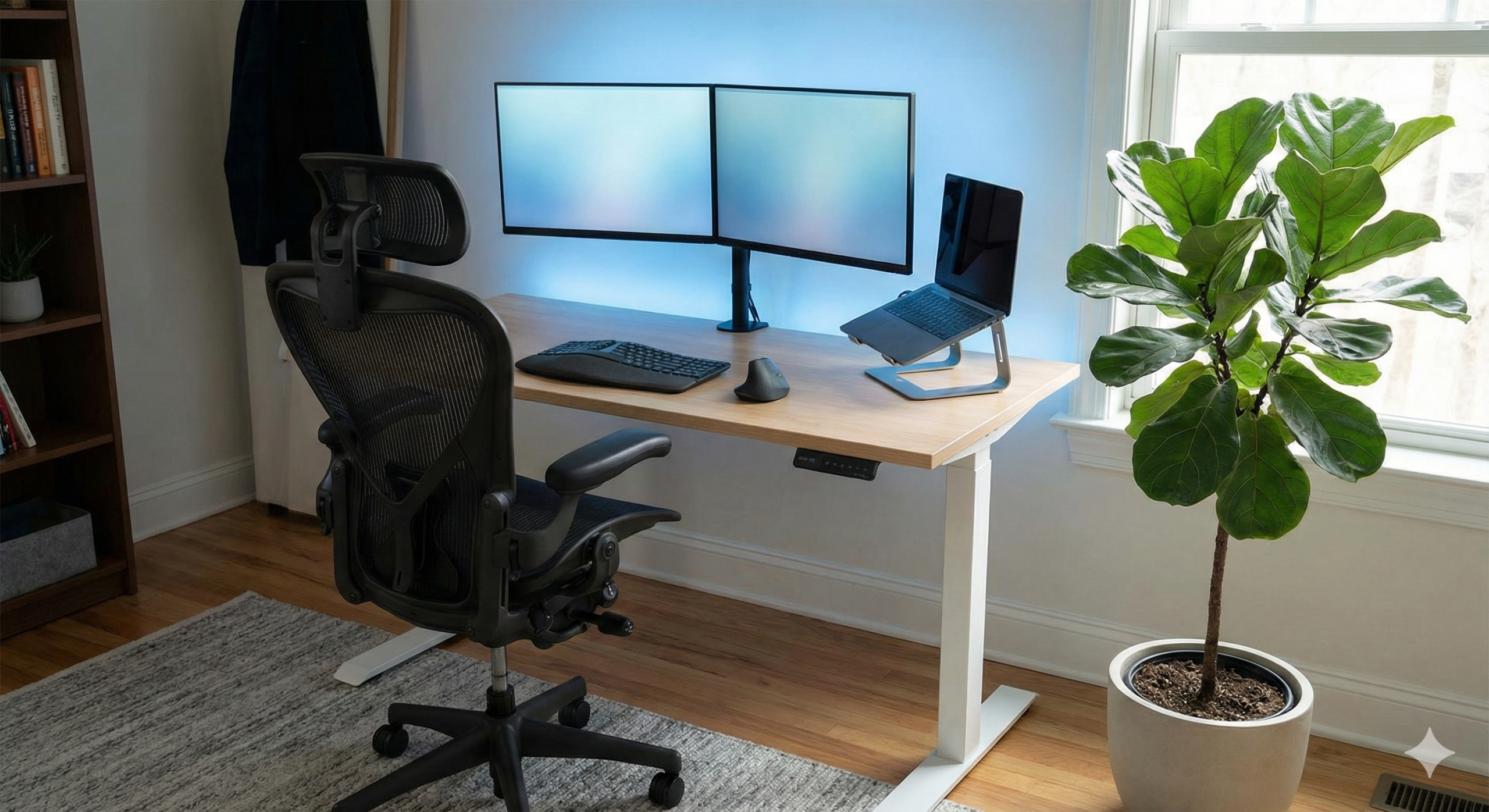
In the early days of the remote work revolution, many professionals made do with a laptop on the kitchen table or a corner of the couch. Convenience mattered more than comfort. Years later, the physical toll of these temporary setups has become undeniable. Chronic back pain, repetitive strain injuries (RSI), and visual fatigue have silently drained energy and performance across entire workforces. A professional workspace is no longer a luxury; it is a medical necessity and a productivity engine. Ergonomics—the science of designing the job to fit the worker—is the decisive factor in determining whether your home office extends your career or slowly breaks your body.
A truly ergonomic workspace does something far more powerful than improving posture. It changes how you feel about work. The moment you sit down, your body recognizes stability, alignment, and balance. Your brain responds in kind, reducing physical stress signals and allowing attention to focus on cognitive tasks rather than discomfort. This guide details how to build a home office that protects your health, supports sustained concentration, and signals clearly that this is a space for productive, serious work.
1. The Foundation: The Ergonomic Chair
If you invest in only one item, make it your chair. You will spend more time in it than in your car, your couch, or even your bed. A poor chair does not just cause discomfort; it silently alters your movement patterns. When your spine receives inadequate support, surrounding muscles are forced to compensate. Over time, this imbalance leads to stiffness, fatigue, and long-term injury.
Standard dining chairs are not designed for eight-hour work sessions. They are static, flat-backed, and provide no lumbar support. As you settle into them, your spine collapses into a “C” shape that compresses spinal discs and shifts pressure into the lower back. That tension does not remain local; pain migrates upward into your shoulders and neck and downward into your hips.
A true ergonomic chair must preserve the natural “S” curve of your spine. Look for chairs with adjustable lumbar support rather than fixed cushions. Every spine is different, and a one-size-fits-all solution rarely fits anyone correctly. Seat depth must also be adjustable, allowing two to three fingers of space between the seat edge and the back of your knees to avoid circulation problems. Armrests should support the elbows lightly without forcing shoulders upward.
Breathability matters more than aesthetics. Mesh-backed chairs reduce heat buildup during long focus sessions. High-end options such as the Herman Miller Aeron and Steelcase Leap continue to lead the industry due to their long-term durability and full customization. Budget-conscious professionals can look toward Secretlab or Autonomous for reliable mid-range alternatives offering serious support at accessible prices.
A good chair disappears beneath you. You stop thinking about it—and that is exactly its job.
2. The Desk: Embracing Movement
The phrase “sitting is the new smoking” may sound dramatic, but the underlying insight is valid. Prolonged static posture slows metabolism, weakens circulation, and stiffens joints. Your body is not designed to hold any position for hours at a time, no matter how perfect the position may seem.
This is where sit-stand desks become invaluable. The goal is not to stand all day, which can cause fatigue in the feet and knees, but to alternate postures. Small shifts in stance throughout the day restore blood flow to the brain and stabilize energy during afternoon slumps. Even slight height adjustments between emails can reset circulation and improve alertness.
Desk height is critical. When seated, your elbows should form a right angle while typing. Your wrists should remain neutral instead of bending upward or downward. When standing, that same alignment should remain intact. Adjustable desks with digital height presets make transition effortless, encouraging consistency rather than discipline.
But movement should extend beyond posture swapping. Build micro-movement into your day. Use stretch reminders. Walk during phone calls. Perform short mobility routines every few hours. Ergonomics does not stop at furniture—it lives in habits.
3. Monitor Placement: Protecting Your Eyes and Neck
Your head weighs between ten and twelve pounds. Every inch you tilt downward dramatically multiplies that pressure on your neck. This is how “tech neck” forms. Laptop screens placed directly on desks force the spine into a constant forward tilt, creating chronic strain that eventually radiates into shoulders, jaw tension, and headaches.
Your monitor should meet your gaze, not the other way around. The top third of the screen should align with eye level. When you look straight ahead, the browser address bar should sit comfortably within view. This keeps your head balanced over your shoulders rather than in front of them.
Distance matters as much as height. Position your screen about an arm’s length away. If you constantly lean forward, increase font size before adjusting distance. Posture should never bend for technology. Technology bends for posture.
If you work on a laptop, raise it immediately. A simple stand or stacked books can dramatically improve neck alignment. Pair that with an external keyboard and mouse and transform any table into an ergonomic workstation.
4. Lighting: Reducing Strain and Glare
Lighting is one of the most overlooked ergonomic factors in home offices, yet poor lighting silently drains energy and causes tension headaches. A single overhead bulb creates harsh contrast, while sitting directly in front of a window creates feedback glare that strains the eyes.
Ideally, place your desk perpendicular to natural light sources, allowing daylight to enhance visibility without reflecting directly onto your screen. Supplement overhead lighting with a focused desk lamp that casts indirect light across your workspace.
One advanced technique that dramatically improves comfort is bias lighting. Installing an LED strip behind your monitor reduces contrast between your bright screen and dark room. This stabilizes eye adjustment and reduces fatigue during long sessions.
For video calls, lighting becomes a professional tool. Avoid strong backlighting. Use a desk lamp or ring light positioned in front of you, angled softly to illuminate facial features without creating shadows.
Good lighting is invisible. Bad lighting demands attention through discomfort.
5. Input Devices: Saving Your Wrists
Carpal Tunnel Syndrome does not announce itself dramatically. It builds slowly through subtle strain until numbness, tingling, and pain become unavoidable. Prevention lies in neutral positioning.
Traditional flat keyboards force wrists outward into unnatural angles. Ergonomic split keyboards allow hands to rest at shoulder-width, creating straight alignment from elbow to fingertip. Mechanical motion becomes symmetrical rather than twisted.
Similarly, conventional mice force the forearm into constant rotation. Vertical mice rotate the hand into a handshake position, releasing tension in forearm muscles that would otherwise accumulate quietly.
If your work involves extended typing or design, these tools are not optional add-ons. They are career insurance.
6. The “Zone” Factor: Acoustics and Boundaries
Ergonomics also includes what you cannot touch. Sound pollution fractures attention in ways posture never could.
If you lack a dedicated office room, noise-canceling headphones anchor focus by constructing an auditory boundary. They create psychological separation as much as acoustic silence.
Physical boundaries matter, too. A rug under your desk, a room divider, or even a specific wall signals work mode to your brain. When you leave that zone, work ends. This separation protects mental health just as posture protects physical health.
Your environment should defend focus automatically.
7. Temperature, Airflow, and Comfort
Temperature directly impacts productivity. Cold stiffens joints. Excessive heat saps energy. Aim for moderate airflow and stable warmth.
Position fans or heating vents away from direct contact. Use layers to adapt easily without disrupting concentration. Humidity levels also matter—dry air contributes to eye irritation and dehydration.
Comfort should never be distracting. You should never think about your temperature. You should only think about your work.
8. Desk Organization: Clarity Equals Capability
Visual clutter is cognitive clutter. Disorganized desks create subconscious stress.
Maintain a workspace that contains only what you use daily. Route cables using clips or trays. Keep drawers minimal. Leave open space for writing or gestures.
A clean workspace is not aesthetic minimalism—it is mental hygiene.
9. Posture Is Not Static
Perfect posture does not exist.
Good posture is varied posture.
The strongest position is the next one. Shift, lean, adjust, stand, walk. Every movement restores circulation and reduces strain accumulation.
Your body stays functional because it moves.
Conclusion: Invest in Your Career Longevity
Building an ergonomic home office is not an expense; it is an investment in your body—the only hardware you cannot upgrade. By prioritizing a supportive chair, correct monitor positioning, intelligent lighting, and movement-friendly routines, you extend your career lifespan while increasing daily output.
Pain is not the cost of productivity.
It is the cost of poor design.
Design your environment wisely, and work becomes easier, cleaner, and sustainable.